.png)
.png)
Hey folks,
This month we've got two updates that sit on opposite ends of the spectrum. One is a brand new feature that's been a long time coming. The other is a small settings change that cleans up something that should have been simpler from the start. Both are about the same thing at their core: putting you in control so you spend less time wrestling with the platform and more time running your event.
What's New
Scheduled Custom Reports
Custom Reports have always been one of the more powerful tools in your dashboard. But until now, using them meant logging in, generating the report, and either downloading it yourself or forwarding it to whoever needed it. If you wanted stakeholders to get a weekly update on registration numbers or exhibitor signups, that was on you to remember and deliver.
That changes now. You can schedule any Custom Report to generate and send automatically.
Head to the new "Automatic Report Generation Settings" section on any Custom Report, toggle on "Enable Weekly Report Generation," choose a day of the week and time, pick your recipients from your organization's admin list, and you're done. PheedLoop handles the rest. Every week, at the time you chose, the report generates and lands in their inbox as a downloadable attachment.
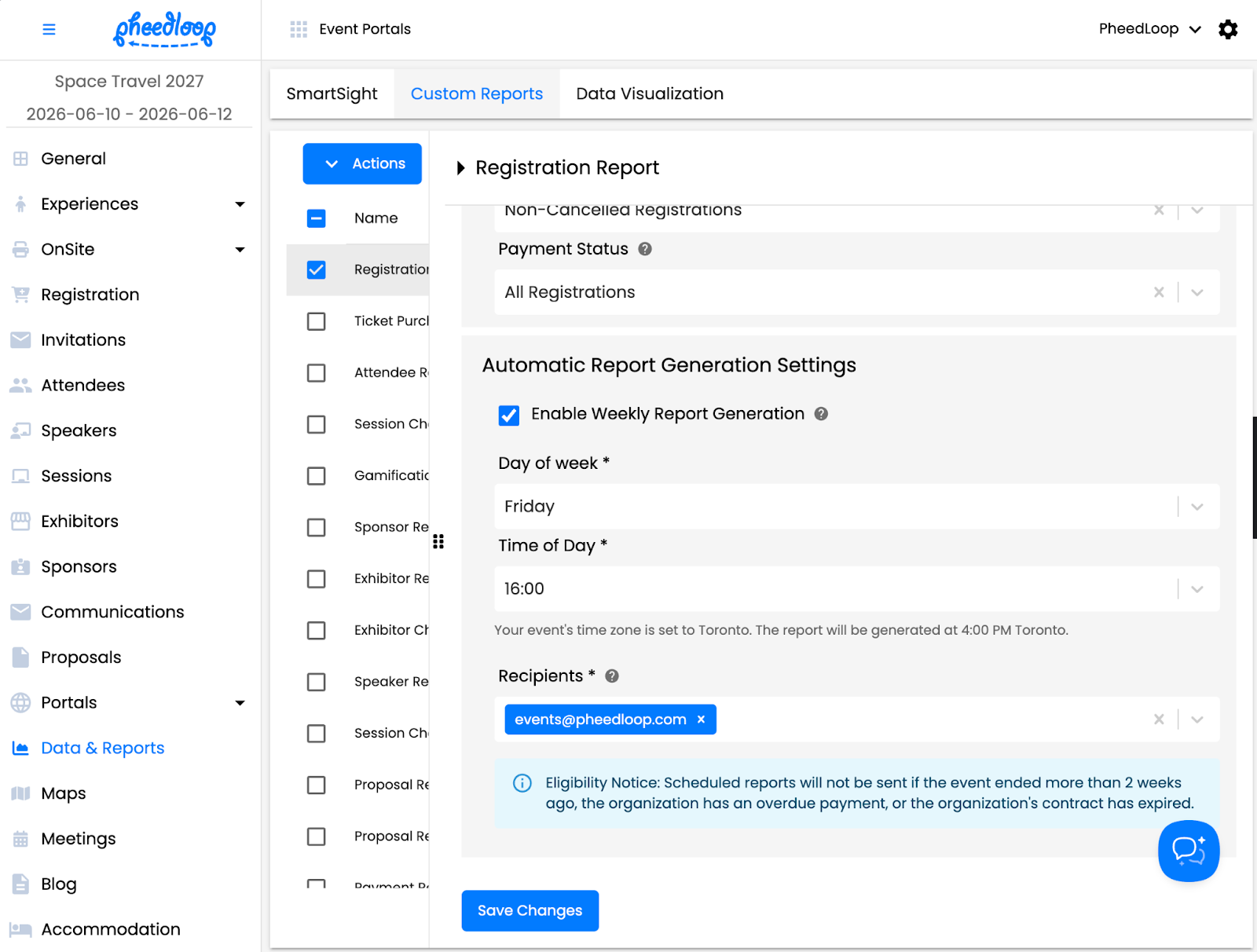
It's the kind of thing that sounds simple but has a real impact on how teams stay informed. Sponsors, stakeholders, board members, your own team — anyone who needs a consistent view of how the event is tracking can now get it without you being the middleman. Week over week, the data shows up on its own. You set it once and move on. And if a report is too large to attach directly, we'll include a secure download link instead.
Clearer Control Over Registration Autofill
If you've ever set up group registration and found yourself confused by how ticket information gets pre-filled, you're not alone. The old behavior was controlled by a combination of settings that weren't obvious — behind the scenes, it depended on whether "Group Details Required" was enabled and what category type you were using. It worked, but it wasn't intuitive, and there was no way to just say "don't autofill anything."
We've replaced all of that with a single, straightforward setting on each ticket: "Pre-fill Ticket Info."

You get three options. "All" pre-fills every ticket with the registrant's details — great for cases where one person is buying multiple seats and wants to move fast. "First" fills in the first ticket and leaves the rest blank, which is the most common scenario for group registrations where each attendee is a different person. "None" skips autofill entirely, so every ticket starts as a blank form.
If this sounds familiar, it's the same kind of cleanup we did a few months back when we replaced those confusing group registration checkboxes with a single Category Type dropdown. We keep finding spots where the platform's logic made sense internally but didn't translate well into something you could quickly understand and configure. When we find them, we fix them.
For existing events, we've already migrated your tickets to the appropriate setting based on your previous configuration, so nothing changes unless you want it to.
The real benefit here is flexibility. Some organizers want maximum convenience — fill everything in, let the registrant breeze through. Others need unique information for each ticket holder and don't want stale data carried over. There was never a default that made everyone happy, so now the choice is yours.
Looking Ahead
The big one: PheedLoop Go 2.0 is launching later this month. If you caught our recent announcement, you already know the details — it's a complete rebuild of the mobile event app, faster, more accessible, and redesigned from the ground up. Existing events stay on the current version, and newly created events will start using the new app by default. We'll have documentation and support resources ready before anything changes on your end. If you missed the announcement, you can read the full breakdown on our blog.
Beyond that, we're heads-down on a couple of things. Our badge printing system is getting some attention — we're rethinking how badges are generated to give you more customization and control over the final product. We're also building out new reporting capabilities that go beyond what you pull manually, including automatic post-event reports that deliver a tidy summary of your event's key metrics the day after it wraps. More on both of those soon.
Thanks for reading, and for continuing to build events with us.
—
Adam Cote
Head of Product
PheedLoop

.png)
.png)
.png)